Lynx

<webview> XElement

用于在 Lynx 中嵌入网页,提供灵活的方式集成现有 Web 资源并加速开发。

  • <webview> 在元素侧作为视口,必须有确定的宽度。
  • <webview> 在元素侧作为视口,必须有确定的高度。
  • Web 资源渲染完成后,可使用 document.getElementById 获取自身高度,通过 message 通知 <webview> 修改高度。
  • 除非设置了 <x-webview native-interaction-enabled={false} />,否则 <webview> 的交互事件无法穿透到其他元素。
  • <webview> 不能与其他可滚动元素嵌套使用,如有需要请使用 <scroll-view> 进行包裹。
  • 若需拦截点击事件,需手动添加 <x-webview catchtap={() => {}} />

使用指南

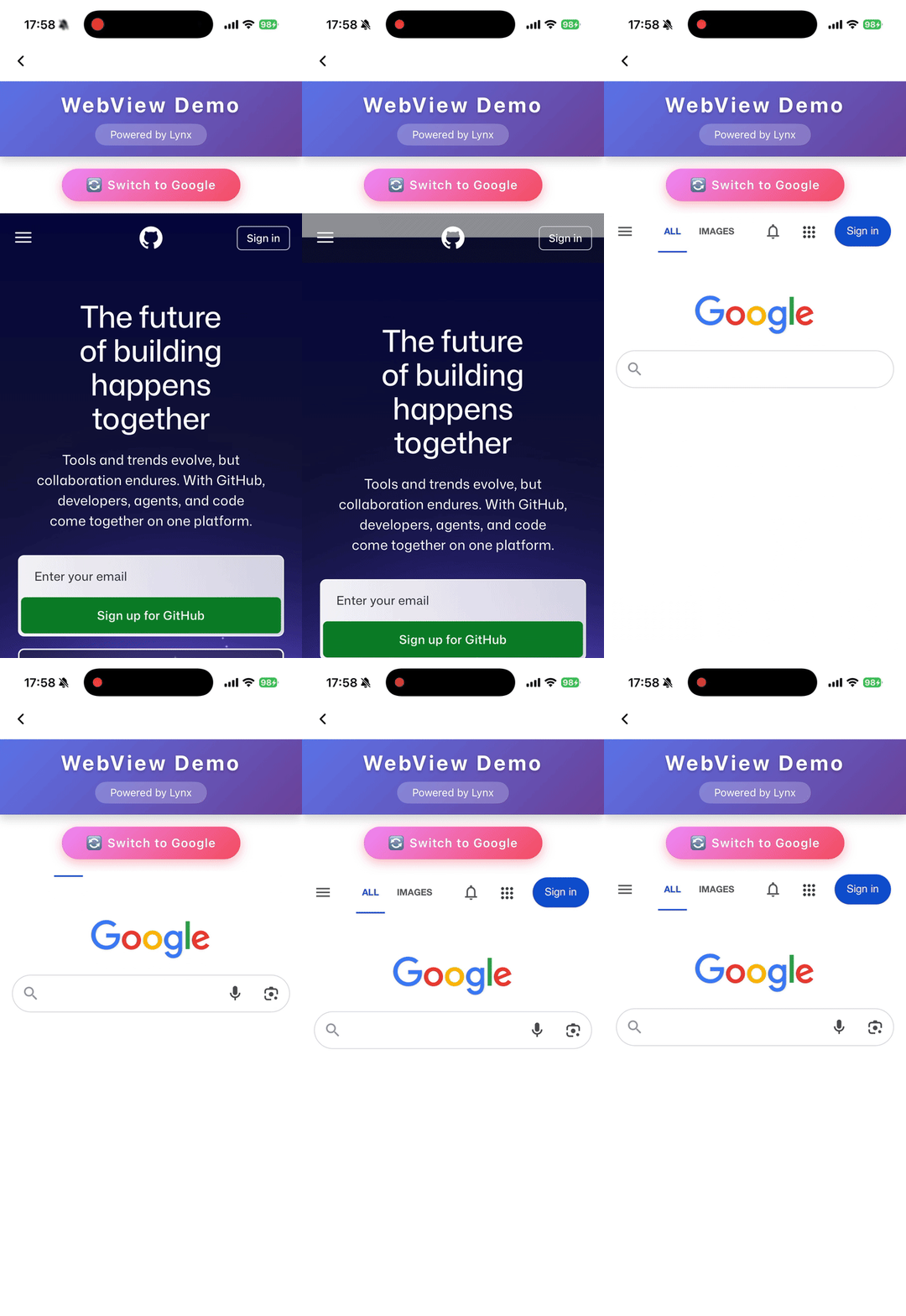
加载 Web 内容

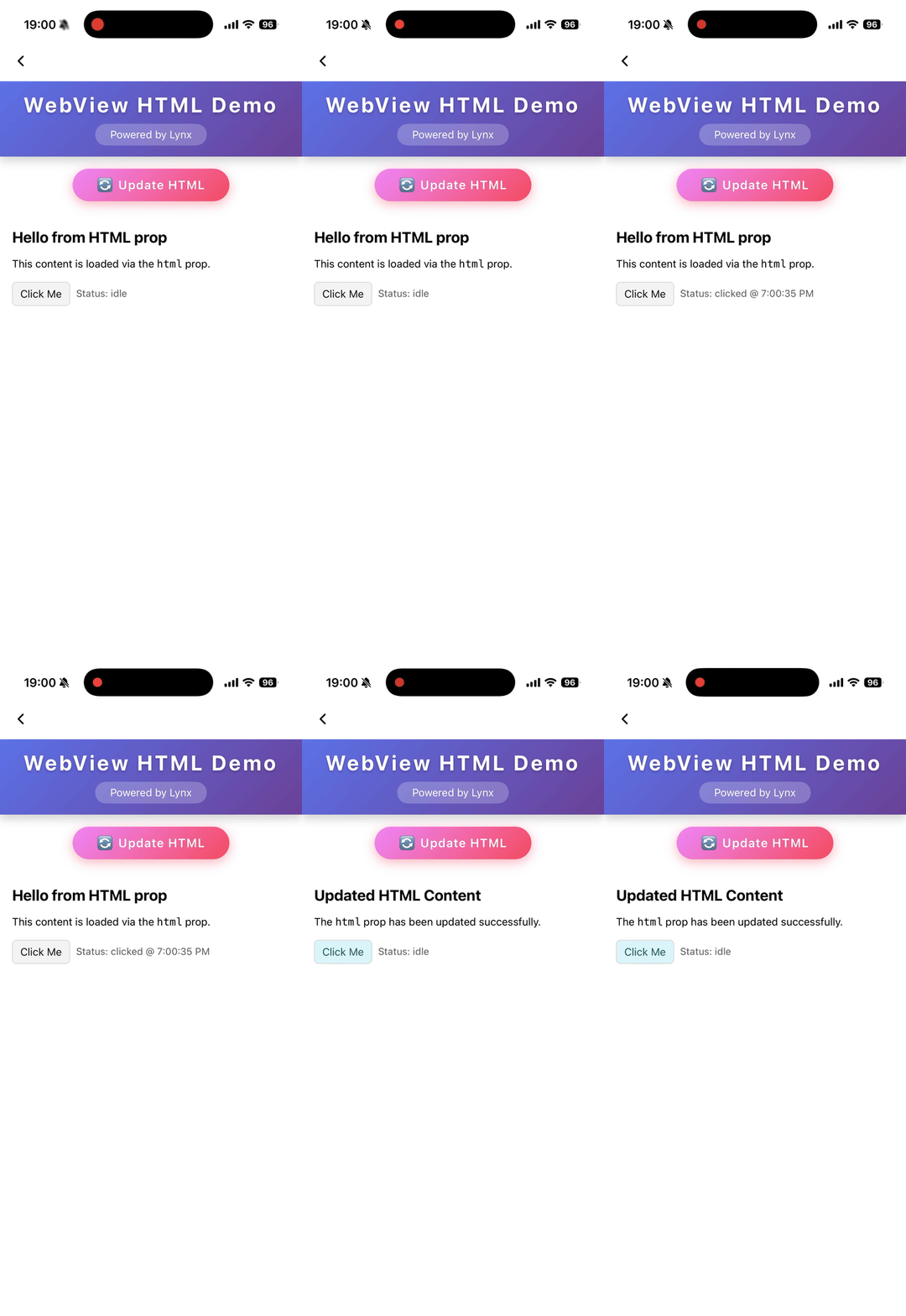
加载 HTML 字符串

属性

bounces

iOS
// @defaultValue: false
bounces?: boolean;

启用弹性效果

cookies

Clay
Lynx 3.5
cookies?: any;

预设 cookies

enable-debug

Android
iOS
Clay
Harmony
// @defaultValue: false
'enable-debug'?: boolean;

启用 WebView 调试,可在 Chrome DevTools 中进行调试

html

Android
iOS
Harmony
3.6
html?: string;

表示要加载的 HTML 内容的字符串。当 html 变化时会自动触发内容刷新。优先级低于 src

initjs

Clay
Lynx 3.5
initjs?: string;

在文档就绪时执行的 JavaScript

params

Android
iOS
params?: object;

外部 webview 实现的参数

scroll-bar-enable

iOS
// @defaultValue: false
'scroll-bar-enable'?: boolean;

启用滚动条

src

Android
iOS
Clay
Harmony
src?: string;

表示远程服务器上资源位置的字符串。当 src 变化时会自动触发内容刷新。

use-osr

Clay
Lynx 3.5
// @defaultValue: false
'use-osr'?: boolean;

是否启用离屏渲染模式

webview-type

Android
iOS
Harmony
// @defaultValue: 'default'
'webview-type'?: string;

指定 webview 的类型,可以是通过 LynxService 注入的 webview 实现

事件

前端可以绑定对应的事件回调来监听元素的运行时行为,如下所示。

binderror

Android
iOS
Clay
Harmony
binderror = (e: WebviewErrorEvent) => {};
字段类型可选默认值平台起始版本描述
errorCodenumber
Android
iOS
Clay
Harmony
表示错误码的数字
errorMsgstring
Android
iOS
Clay
Harmony
表示错误信息的字符串

加载错误事件

bindload

Android
iOS
Clay
Harmony
bindload = (e: BaseEvent) => {};

加载成功事件

bindlocationchange

Clay
Lynx 3.5
bindlocationchange = (e: WebviewUrlEvent) => {};
字段类型可选默认值平台起始版本描述
urlstring
Clay
表示目标 URL 的字符串

页面地址变化事件

bindmessage

Android
iOS
Clay
Harmony
bindmessage = (e: WebviewMessageEvent) => {};
字段类型可选默认值平台起始版本描述
msgstring
Android
iOS
Clay
Harmony
表示消息内容的字符串

来自 JavaScript 的消息事件

bindopenwindow

Clay
Lynx 3.5
bindopenwindow = (e: WebviewUrlEvent) => {};
字段类型可选默认值平台起始版本描述
urlstring
Clay
表示目标 URL 的字符串

打开新窗口事件

方法

前端可以通过 SelectorQuery API 调用组件方法。

cookies.flushStore

Clay
Lynx 3.5

lynx.createSelectorQuery()
     .select('#id')
     .invoke({
      method: 'cookies.flushStore',
      success: function (res) {},
      fail: function (res) {},
    })
    .exec();

将所有未写入的 cookies 数据刷新到磁盘

cookies.get

Clay
Lynx 3.5

lynx.createSelectorQuery()
     .select('#id')
     .invoke({
      method: 'cookies.get',
      params: {
        /**
         * 获取域名匹配或为其子域名的 cookies
         * @PC
         */
        domain?: string;
        /**
         * 按 httpOnly 过滤 cookies
         * @PC
         */
        httpOnly?: boolean;
        /**
         * 按名称过滤 cookies
         * @PC
         */
        name?: string;
        /**
         * 获取路径匹配的 cookies
         * @PC
         */
        path?: string;
        /**
         * 按 Secure 属性过滤 cookies
         * @PC
         */
        secure?: boolean;
        /**
         * 过滤会话 cookie 或持久化 cookie
         * @PC
         */
        session?: boolean;
        /**
         * 获取与指定 URL 关联的 cookies。为空则获取所有 URL 的 cookies
         * @PC
         */
        url?: string;
      };
      success: function (res) {},
      fail: function (res) {},
    })
    .exec();

从 webview 获取 cookies

cookies.remove

Clay
Lynx 3.5

lynx.createSelectorQuery()
     .select('#id')
     .invoke({
      method: 'cookies.remove',
      params: {
        /**
         * 要删除的 cookie 名称
         * @PC
         */
        name?: string;
        /**
         * 与 cookie 关联的 URL
         * @PC
         */
        url: string;
      };
      success: function (res) {},
      fail: function (res) {},
    })
    .exec();

删除匹配 url 和 name 的 cookies

cookies.set

Clay
Lynx 3.5

lynx.createSelectorQuery()
     .select('#id')
     .invoke({
      method: 'cookies.set',
      params: {
        /**
         * cookie 的域名。省略时默认为空
         * @PC
         */
        domain?: string;
        /**
         * cookie 的过期时间,为 UNIX 纪元以来的秒数
         * @PC
         */
        expirationDate?: number;
        /**
         * cookie 是否标记为 HTTP only
         * @PC
         * @defaultValue false
         */
        httpOnly?: boolean;
        /**
         * cookie 的名称
         * @PC
         */
        name: string;
        /**
         * cookie 的路径。省略时默认为空
         * @PC
         */
        path?: string;
        /**
         * 应用于此 cookie 的 Same Site 策略。可为 unspecified、no_restriction、lax 或 strict
         * @PC
         * @defaultValue 'lax'
         */
        sameSite?: string;
        /**
         * cookie 是否标记为 secure
         * @PC
         * @defaultValue false
         */
        secure?: boolean;
        /**
         * 关联 cookie 的 URL
         * @PC
         */
        url: string;
        /**
         * cookie 的值。省略时默认为空
         * @PC
         */
        value?: string;
      };
      success: function (res) {},
      fail: function (res) {},
    })
    .exec();

为 webview 设置 cookie

eval

Android
iOS
Clay
Harmony

lynx.createSelectorQuery()
     .select('#id')
     .invoke({
      method: 'eval',
      params: {
        /**
         * 函数名称:`javascriptFunc(arg1, arg2)`。
         * @Android
         * @iOS
         * @Harmony
         * @PC
         */
        func: string;
      };
      success: function (res) {},
      fail: function (res) {},
    })
    .exec();

调用 JavaScript 函数

reload

Android
iOS
Clay
Harmony

lynx.createSelectorQuery()
     .select('#id')
     .invoke({
      method: 'reload',
      success: function (res) {},
      fail: function (res) {},
    })
    .exec();

重新加载 webview

兼容性

LCD tables only load in the browser

除非另有说明,本项目采用知识共享署名 4.0 国际许可协议进行许可,代码示例采用 Apache License 2.0 许可协议进行许可。